免费黄网站在线观看_成人午夜剧场免费观看完整版_多野结衣av一区_亚洲激情在线视频_国产乱码精品一区二区三区亚洲人 _国产成人精品三级_视频一区视频二区视频三区高_一区福利视频_国产成人精品午夜_蜜桃成人365av_国产精品美女久久久久久久_国产伦精品一区二区三区视频免费

您的位置:網站首頁 > Solidworks

如何更加高效利用[打開]對話框

時間:2008-07-21 18:32:05 來源:

How to use the Open dialog box more effectively

One aspect of SolidWorks® interface you work with each day is the Open dialog box. This tech tip explains options within the Open diaolog box that will improve your productivity.

Here are some of the capabilities available within the Open dialog box:

•  SolidWorks remembers the location and size of the Open dialog

•  When you hover over a document, a quick tip showing the type of document, last saved by, and file size appears.


Figure 1

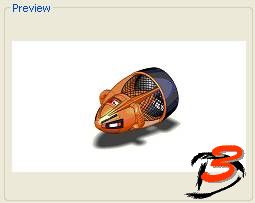
•  The preview picture is always calculated in the isometric view and centered in the view correctly no matter where the model is located in space. If you use the ToolsOptionGeneral setting show below, the preview will be of the last saved state.


Figure 2

•  Multiple files can be selected by using the Ctrl and Shift keyboard keys. You can also box select the files by holding down the left mouse button and drag a window around the files to select as shown below.

Figure 3

•  By right clicking a SolidWorks associated file in the Open dialog box you can start the Pack and Go, Rename, or Replace commands.


Figure 4

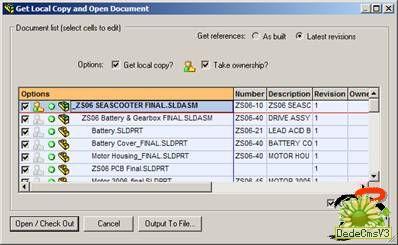
•  If you have PDMWorks® Workgroup installed there will be two more additional icons that appear on the left side of the Open dialog box.

The first icon allows you to view the content in your local workspace. This is also the same icon that is displayed in the Save dialog box.


The second icon allows you to get to the PDMWorks vault on your PDMWorks vault machine.


The Check Out advanced button pops up a screen that lets you specify more PDMWorks parameters.


#p#分頁標題#e#Figure 4

•  You can filter (limit) the types of files shown by selecting a document type from the Files of type pull-down menu shown below.

To get to the *.* option to see every file in the folder use the combination “CTRL key and arrow down” in the Files of type text box or simply browse through the list. You can optionally type *.* in the File name text box.


Figure 5

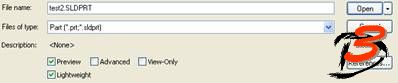
•  To quickly open a document to only view its contents, the View Only option can be used. The document cannot be edited and some information (FeatureManager design tree) will not be available.

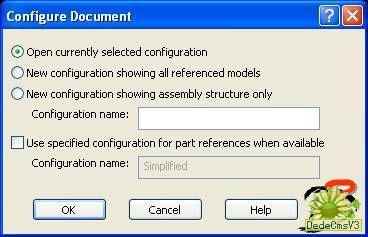
•  By selecting the Advanced button, the following dialog box will appear before the document is opened. This allows you to create a new configuration or open an existing one.


Figure 6

•  The Configurations section of the Open dialog box can be used to select which configuration to open. If you want a specific configuration, select and open it directly.


Figure 7

•  The display of the documents can be changed just like in Windows® Explorer by selecting the pull-down menu shown below and select the display type.


Figure 8

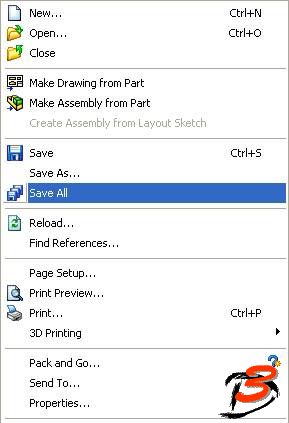
•  The Save All command is useful as it will save all open documents that need to be saved, not just the current document.


精品欠久久久中文字幕加勒比| 亚洲成人在线视频播放| 精品久久久久久中文字幕大豆网 | 在线观看日韩欧美| 欧美极品xxxx| 久久99精品久久久久久琪琪| 中文字幕日韩一区二区三区| 欧美成人精品一区二区男人小说| 亚洲一区二区免费看| 午夜精品久久17c| 四虎影视精品永久在线观看| 欧美精品视频www在线观看| 97秋霞电影网| 中文字幕欧美国产| 99在线免费视频观看| 免费高清在线一区| 欧美国产日韩在线播放| 在线播放毛片| 91中文在线视频| 国产免费999| 国产91视频一区| 久久超碰97人人做人人爱| 久青草国产97香蕉在线视频| 欧美成人免费电影| 少妇精69xxtheporn| 福利一区视频| 国产亚洲欧洲黄色| 高清亚洲高清| 欧美精品videos另类日本| 欧洲杯半决赛直播| 97在线观看视频| 欧美裸体在线版观看完整版| 91精品中国老女人| 玖玖国产精品视频| www.亚洲成人网| 国产欧美日韩另类视频免费观看| 午夜视频在线瓜伦| 欧美午夜影院在线视频| 免费观看黄色网| 在线观看一区不卡| 国精产品一区一区三区mba下载| 亚洲国产欧美一区二区三区同亚洲 | 伪装者在线观看完整版免费| wwwwxxxx在线观看| 亚洲福利视频二区| 欧美经典一区| 久久99欧美| 国产高清久久久久| 成人在线视频成人| 中文字幕日韩综合av| 18国产精品| 欧洲亚洲一区| 亚洲欧洲av在线| 一区二区三区 日韩| 性欧美长视频免费观看不卡| 精品国产影院| 久久综合中文色婷婷| 欧美激情一区二区在线| 日本高清中文字幕在线| 97欧美精品一区二区三区| 亚洲人成人一区二区三区| 日韩免费高清在线| 日韩av中文在线| 亚洲欧美一级二级三级| 天天插天天操天天射| 亚洲第一综合天堂另类专| 中文字幕一区二区三区在线视频| 看av免费毛片手机播放| 欧美三级电影网站| 国产精品密蕾丝视频下载| 999精品网站| 久久久av电影| 国产成人aaa| 中文字幕成在线观看| 俄罗斯精品一区二区| 99久久国产综合色|国产精品| 欧美三级一级片| 亚洲激情中文字幕| 免费视频最近日韩| 国产午夜精品美女视频明星a级| 成人在线国产| 在线观看av片| www.日韩系列| 97aⅴ精品视频一二三区| 欧美色999| 国产a级一级片| 九色精品美女在线| 久久亚洲综合av| 黄毛片在线观看| 人妻夜夜添夜夜无码av| 日韩中文在线中文网三级| 一本色道久久综合亚洲精品不| 新的色悠悠久久久| 亚洲free性xxxx护士hd| 亚洲精品水蜜桃| 91综合在线| 国产成人天天5g影院在线观看| 国产成人精品日本亚洲专区61| 99精品视频一区二区| 中文在线免费一区三区| 亚洲天堂2017| 黄色小说在线播放| 欧美一区二区三区爱爱| 日韩精品国产精品| 国产精品777777在线播放| 牛夜精品久久久久久久| 精品sm捆绑视频| 免费在线视频一级不卡| 中文在线综合| 韩国三级在线观看久| 91在线国产电影| 精品国产欧美一区二区| 蜜桃视频在线一区| 97视频在线观看免费| 欧美视频你懂的| 国产成人午夜精品影院观看视频| 成人免费直播在线| 国产精品视频一区二区久久| 国产二区视频在线| 成人性生交大片免费看视频直播 | 国产精品夜夜夜一区二区三区尤| 亚洲二区在线播放视频| 欧美激情一区二区三区蜜桃视频| 国产一区二区三区四区三区四| 精品国产亚洲一区二区在线观看| 欧美成人精品一区二区男人看| 国产乱xxⅹxx国语对白| 天天综合色天天综合色hd| 国产99久久精品一区二区 夜夜躁日日躁| 7777女厕盗摄久久久| 欧美日韩免费区域视频在线观看| k8久久久一区二区三区| 日本va欧美va精品发布| 欧美天堂亚洲电影院在线观看| 日本一区二区中文字幕| 尤物网在线观看| 国产精品久久久久永久免费看| 国产网站免费观看| 老司机精品在线| 黑人玩欧美人三根一起进| 成人免费自拍视频| 男人的天堂在线视频| 99久久久国产| 精品孕妇一区二区三区| 污导航在线观看| 欧美s码亚洲码精品m码| 日韩和欧美一区二区三区| 中文字幕久久亚洲| 一区二区三区四区av| 久久久精品日韩欧美| 日韩高清在线不卡| 老色鬼精品视频在线观看播放| 欧美日韩精品一区二区在线播放| 在线视频超级| 怡红院在线播放| 日韩伦理电影网站| 两个人看的在线视频www| av在线天堂| 香蕉视频免费在线播放| 国产成人午夜电影| 香蕉自在线视频| 国产在线观看a视频| 麻豆av观看| 欧美xxx.com| 91福利在线免费| 97青娱国产盛宴精品视频| 国产日产一区| 免费一级片91| 久久久夜色精品亚洲| 日韩视频永久免费| 青青草国产成人99久久| 久久97超碰国产精品超碰| 成人视屏免费看| 亚洲网友自拍偷拍| 亚洲欧美三级伦理| 欧美巨乳在线观看| 国产欧美日韩最新| 福利网在线观看| 无码人妻精品一区二区三区66| 亚欧黄色av| 99re在线视频| www.成人在线视频| 激情亚洲网站| 国产一区二区免费看| 亚洲三级小视频| 日韩精品一区二区三区中文不卡| 国产成人av网址| 极品美女销魂一区二区三区| 国产精品密蕾丝视频下载| 亚洲精品一区av| xxxxx.日韩| 狼人精品一区二区三区在线 | 欧美日韩国产精品成人| 欧日韩不卡在线视频| 国产成人精品无码播放| 日韩片欧美片| 亚洲五码中文字幕| 在线观看国产欧美| 久久99精品视频一区97| 2019最新中文字幕|